Our Applications
  Company     Contact     Manuals & Brochures     Restricted User Area  
Communications
Initial View
Message Preview
Message Creation
Fax Editor
Sending
Message conversion
Filing system
Searching for messages
Black- & Whitelist
Rules
Offline Reader
Web Access
Calendar
Vessels Database
Position Update
Voyage Calculation
Laytime Calculation
Fixture Report
S & P Database
Invoicing
Address Book
Common:
Home
Imprint

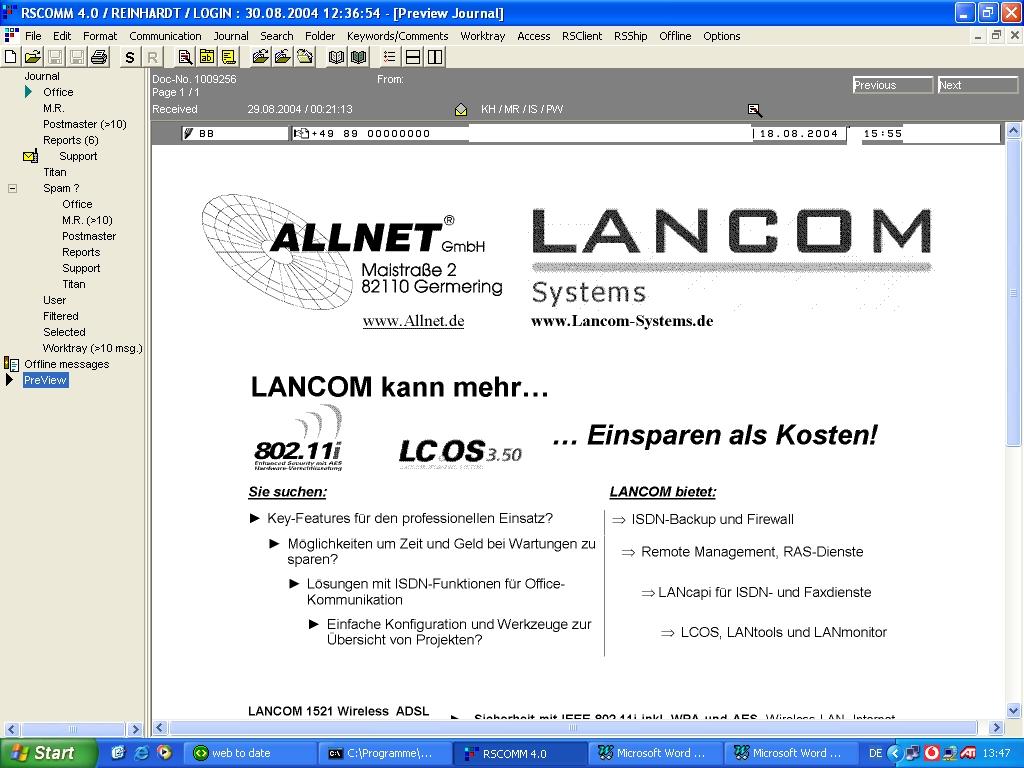
RSCOMM - Preview

Just by mouse click or key stroke you open the current message of your active journal. Regardless, whether the message is a pure text message (Telex), a HTML message (Email) or a graphical message (fax). It is always the integrated viewer, which displays the message.

It also shows you file attachments (on Emails) and additional information.


Again, simply one button or mouse click displays the next or previous message of your currently selected journal. On top of the preview window all relevant information about that message, like date, time, status, sender/receiver, are displayed. In addition, the message header also show all users, who have read and/or edited that message.


Top Nex Page